All material presented on this website, including articles, images, stereograms, flash clips and programs
are copyright protected and can not be used without written permission of the website owner
Stereogram Lab Filter v1.0
for Adobe Photoshop, GIMP, and PaintShop Pro (Windows).
Stereogram Lab Filter is a stereogram maker plug-in, which allows to generate Hidden Image Stereograms right in your Photoshop, which is quite convenient. This filter is
free and you can use it both for commercial and non-commercial purposes, however, distributing the filter itself is not allowed.
Stereogram filter is developed in Filter Meister Plug-in creator.
Installation:
1. Download zip file (the link is above)
2. Unzip to Photoshop Plug-in folder, for example C:\Program Files\Adobe\Photoshop 6.0\Plug-Ins
3. Start Photoshop. You should see Stereogram Lab submenu in Photoshop`s Filter menu
Using Stereogram Lab Filter:
1. Open Texture map in Photoshop or select it if it's opened already.
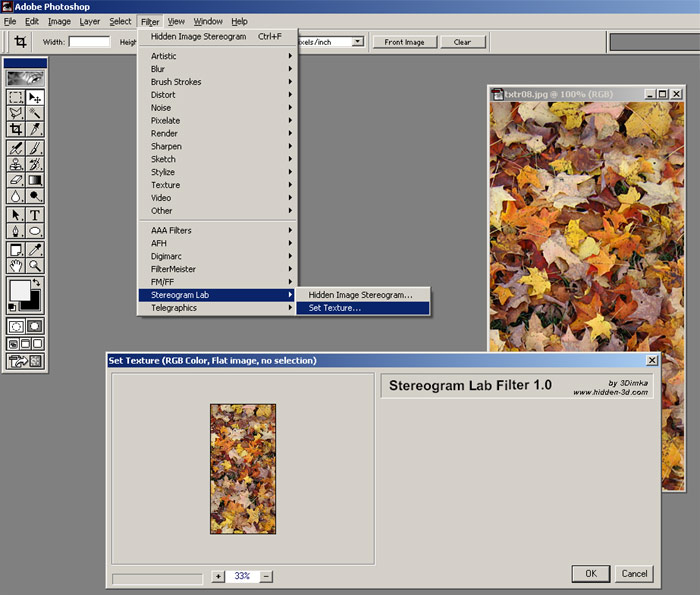
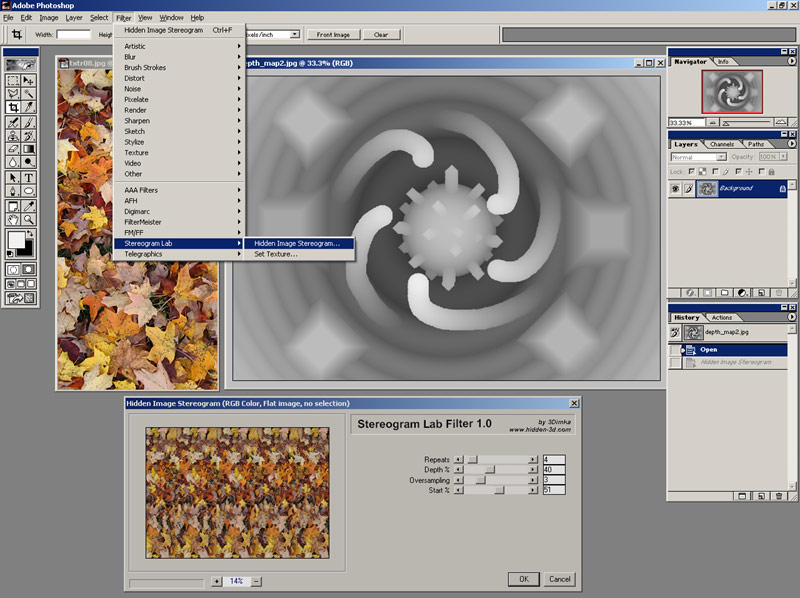
2. Click Menu -> Filter -> Stereogram Lab -> Set Texture. Then Click [OK] button in the dialog window:
3. Open Depth map or select it if it's opened already.
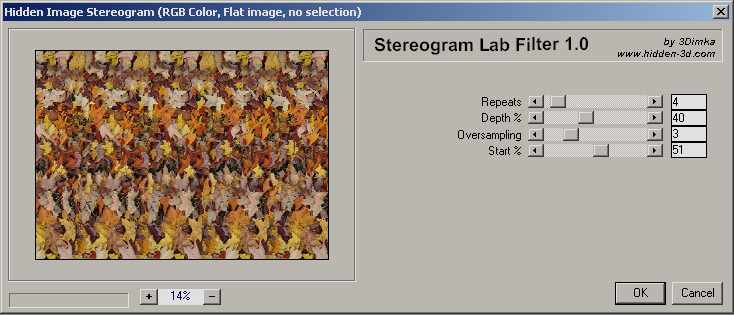
4. Click Menu -> Filter -> Stereogram Lab -> Hidden Image Stereogram. A dialog window with stereogram settings and preview will open:
5. Adjust Rendering settings as desired, live preview will show how the stereogram will look. Repeats - number of texture tiles for background (black color in depthmap) Depth % - Level of third dimension in 1-100% Oversampling - antialias/smoothing quality level. Start % - Horizontal Position where rendering starts. 0-left side, 100%-right side, 50% - middle
6. Click [OK] button when preview looks good and Hidden Image Stereogram will be rendered over your Depthmap.
If setting the texture results in file error make sure the Windows user has writing priviliges for the Photoshop plug-in folder. Another options is to run Photoshop as Administrator.
Recommended alternative software
Stereogram Lab Filter hasn't been updated for a long time and might not work with latest versions of Windows and PhotoShop.
There is alternative software available: Stereographic Suite which includes Stereogram Generator, Texture Maker and Modeler.
Support us
If you liked Stereogram Lab and willing to support us, please consider making a small donation which will help this site to survive.